 Verified
free
Verified
free Turn a GitHub Knowledge Base into a Telegram RAG Bot with Qwen via OpenRouter
Ready to use?
Resources & Links
1. Overview
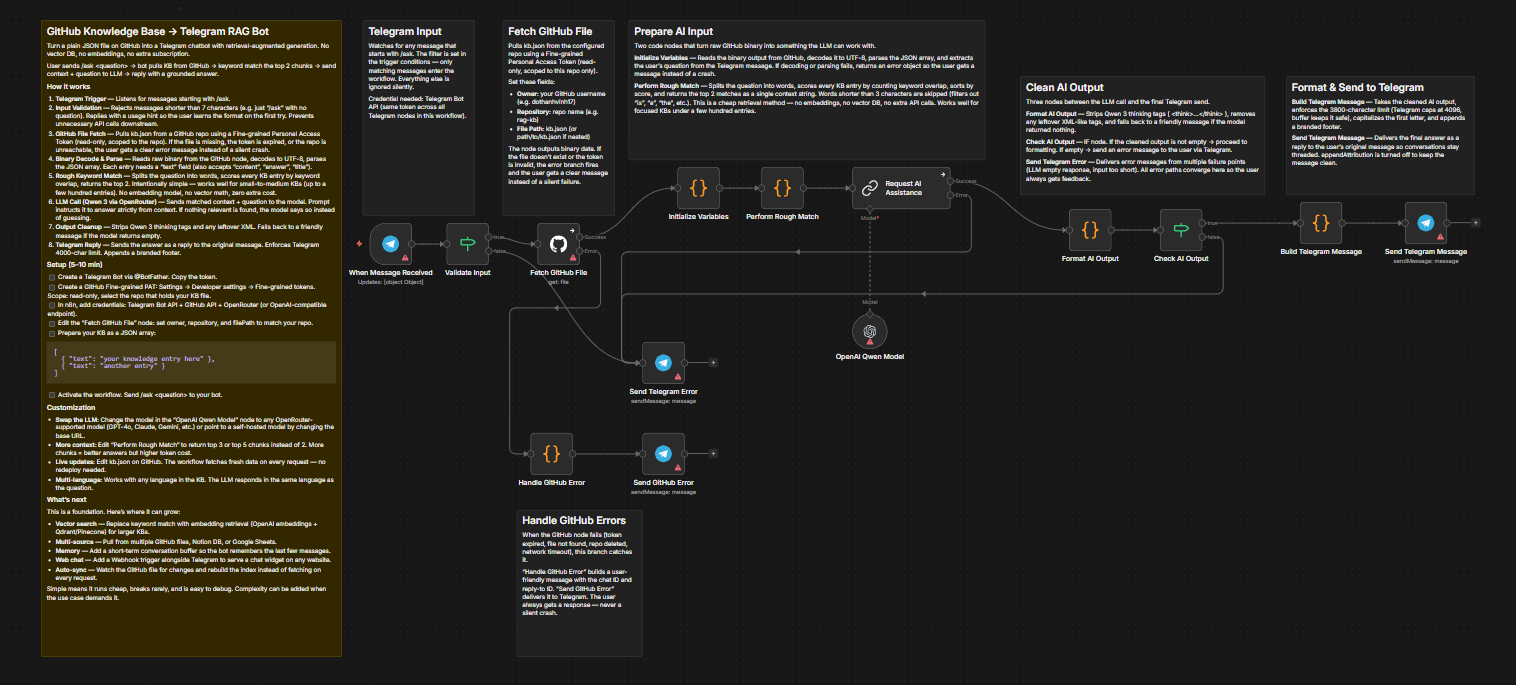
This is a workflow that turns a plain JSON file sitting in a GitHub repository into a fully functional Telegram chatbot with retrieval-augmented generation (RAG) — no Pinecone, no Qdrant, no vector database, no extra subscription. This workflow is useful for anyone who wants to build a customer support chatbot, internal FAQ bot, or Q&A system based on their own documents.
Main Goal: Build a RAG chatbot at zero retrieval cost, easy to maintain and rarely breaks.
🚀 Key Highlight: The system uses local keyword matching combined with Qwen 3 (235B) via OpenRouter — only the most relevant knowledge entries are selected as context for the LLM, with absolutely no external API calls for the retrieval step.
2. Key Features
A. Zero-Cost RAG Without Vector Database The retrieval system runs entirely locally using keyword matching, eliminating the cost and complexity of vector databases completely. Works best with small-to-medium knowledge bases (up to a few hundred entries) focused on a specific topic like FAQ, product info, or internal docs.
- Detail 1: Questions are split into individual words, scored against every knowledge base entry by counting overlapping words, and the top 2 most relevant matches are selected.
- Detail 2: Works without embeddings, vector math, or API calls for retrieval — zero retrieval cost.
B. Smart Validation & Robust Error Handling The workflow is designed to always respond clearly to users, never staying silent when errors occur. Every unexpected situation triggers a specific notification so users know exactly what happened.
- Detail 1: Strict input validation — if a user sends
/askwithout a question or a message that’s too short, the bot responds with format instructions immediately, avoiding unnecessary API calls. - Detail 2: Comprehensive error handling — missing GitHub files, invalid tokens, or empty LLM responses all trigger specific error messages instead of crashing or going silent.
C. Easy Customization & Extensibility The workflow is designed as an open foundation that’s easy to swap models, expand data sources, or integrate additional communication channels.
- Detail 1: Swap to any LLM (GPT-4o, Claude, Gemini…) by simply changing the model name in the node, or point to a self-hosted model by changing the base URL. Adding knowledge only requires editing the JSON file on GitHub, no redeployment needed.
- Detail 2: Automatic multi-language support — whatever language the knowledge base is written in, the bot responds in the same language as the user’s question.
3. Setup Guide
To run this workflow, you need to prepare the following resources:
⚙️ Prerequisites
- n8n Instance: Self-hosted or cloud version.
- Telegram Bot Token: Create via BotFather on Telegram.
- GitHub Personal Access Token: Create a Fine-grained PAT with read-only access, scoped to the repository containing your knowledge base file.
- OpenRouter API Key: Or any OpenAI-compatible endpoint.
Steps:
- Configure GitHub: Create a Fine-grained PAT with read access to the repository. Add the GitHub credential in n8n and configure the “get gh file” node with your repository owner, name, and file path.
- Prepare Knowledge Base: Create a JSON file as an array, each entry with a
"text"field (also accepts"content","answer","title").[ { "text": "your knowledge entry here" }, { "text": "another knowledge entry" } ] - Connect Telegram & OpenRouter: Add your Telegram Bot credential to all four Telegram nodes and your OpenRouter credential to the Qwen model node.
- Activate: Enable the workflow and send
/ask <your question>to your Telegram bot to test immediately.
4. What’s Next
This workflow is designed as a foundation. The keyword matching engine works well for small knowledge bases, but here’s where it can grow:
A. Vector Search Replace the rough keyword match node with an embedding-based retrieval step (OpenAI embeddings + Qdrant or Pinecone) — for larger knowledge bases where keyword overlap alone isn’t enough.
B. Multi-Source Knowledge Base Pull data from multiple GitHub files, Notion databases, or Google Sheets instead of a single JSON file.
C. Conversation Memory Add a short-term memory buffer so the bot remembers the last 3-5 messages in a conversation, allowing users to follow up without repeating context.
D. Web Interface Add a Webhook trigger alongside the Telegram trigger to serve a chat widget on any website.
E. Auto-Sync Watch the GitHub file for changes and rebuild the search index automatically instead of fetching fresh data on every request.
The current version is intentionally simple. Simple means it runs cheap, breaks rarely, and is easy to debug. Complexity can be added when the use case demands it.
⚠️ Cost Warning: The workflow calls the OpenRouter API for every question a user sends. Keyword matching is free but LLM tokens are billed by usage — be careful when running at high frequency or with very large knowledge bases. For knowledge bases of a few hundred entries, the cost per request is minimal.