Hosting Without Touching a Server: What Are Your Options (If You're Not IT-Savvy)?
Hosting Without Touching a Server: What Are Your Options (If You’re Not IT-Savvy)?
Author: Vinh Automation
Content type: Analysis & Comparison
Audience: Beginner / Intermediate
Reading time: 15 minutes
Introduction
A few months ago, a friend running an online clothing store told me his site slows down every afternoon. He was on a $5/month shared hosting plan. I asked: “Why not try a better hosting plan with dedicated resources?” He hesitated: “Sounds complicated. I only know how to buy hosting, point a domain, and install WordPress.”
This story is more common than you think. Many website owners - shop owners, marketers, bloggers - only know “hosting” and “domain”. They don’t know (and don’t need to know) what runs underneath. But when their site starts getting traffic, running ads, or needing more features, they hit a wall.
This article explains the hosting options available today - from basic shared hosting to solutions with dedicated resources - in plain language, without bias, with global terminology references so you won’t get lost when reading documentation from international providers.
Terminology You Need to Know: What Do Major Providers Call Their Virtual Servers?
Before diving in, one thing often causes confusion: the same concept (a private virtual server) goes by different names depending on the provider. In many markets, it’s called VPS (Virtual Private Server). But in the global cloud ecosystem, the naming is more diverse:
| Provider | What They Call It | Notes |
|---|---|---|
| DigitalOcean ⚡ (US) | Droplet | ”A drop in the ocean” — their infrastructure metaphor |
| Vultr (US) | Cloud Compute / Instance | Lines include Standard, High Frequency, Bare Metal |
| Linode / Akamai (US) | Linode / Compute Instance | From Linux + Node |
| Hetzner (Germany, Europe) | Cloud Server / Instance | Best price-to-performance in Europe |
| AWS (Amazon) | EC2 Instance (Elastic Compute Cloud) | The worlds largest cloud platform |
| Google Cloud | VM Instance (Virtual Machine) | Part of Compute Engine |
| Microsoft Azure | Azure VM / Virtual Machine | Expensive, less common for standard web hosting |
Bottom line: The most portable keyword for finding international documentation is “Instance” (a virtual server instance). Instead of searching “Best VPS for WordPress”, English-speaking users search “Best Cloud Compute Instances for WordPress” or “Top Cloud Server Providers”.
In this article, I use “instance” and “cloud server” interchangeably - the standard global terminology.
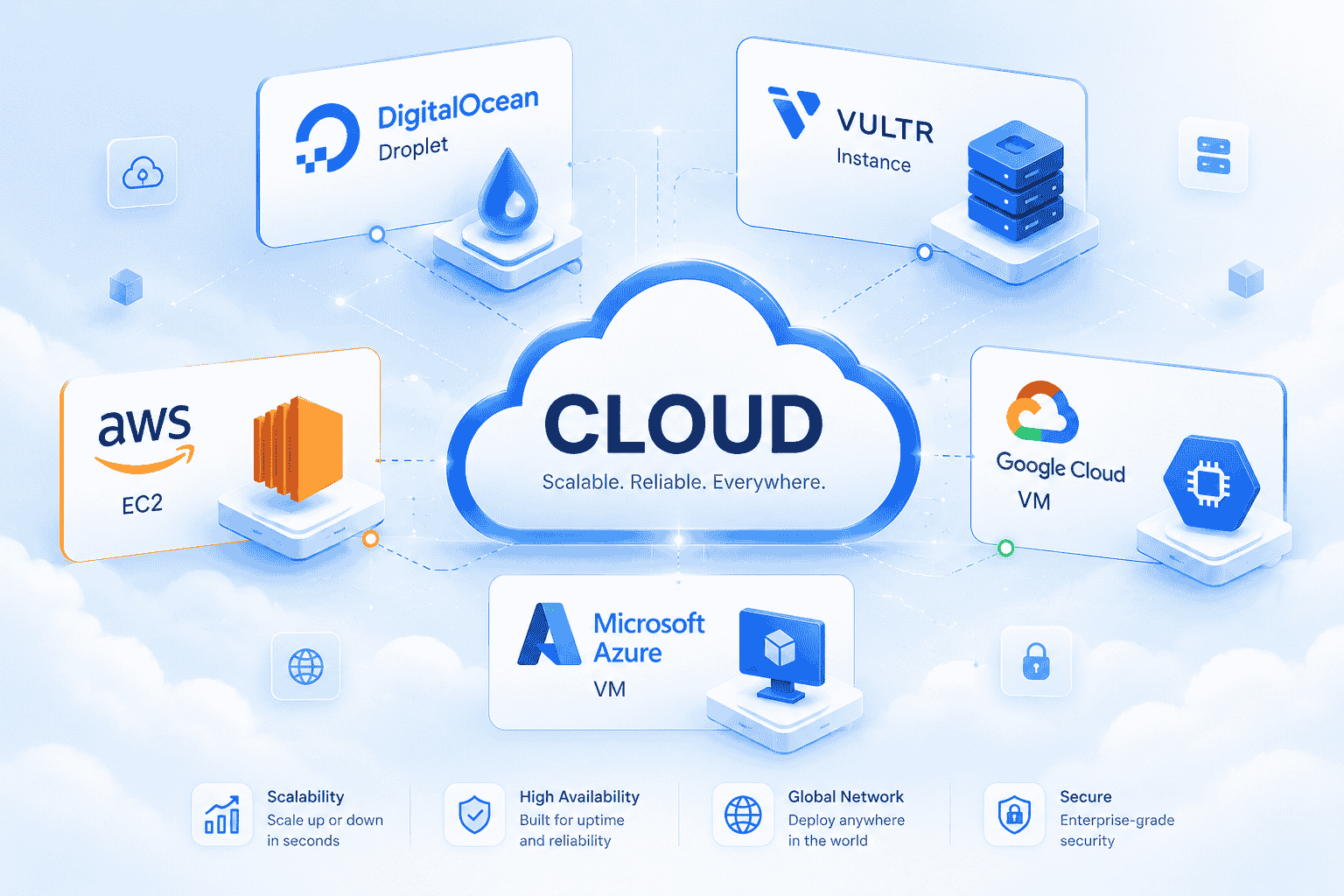
Major cloud providers and their own names for virtual servers: DigitalOcean Droplet, Vultr Instance, AWS EC2, Google Cloud VM, Azure VM
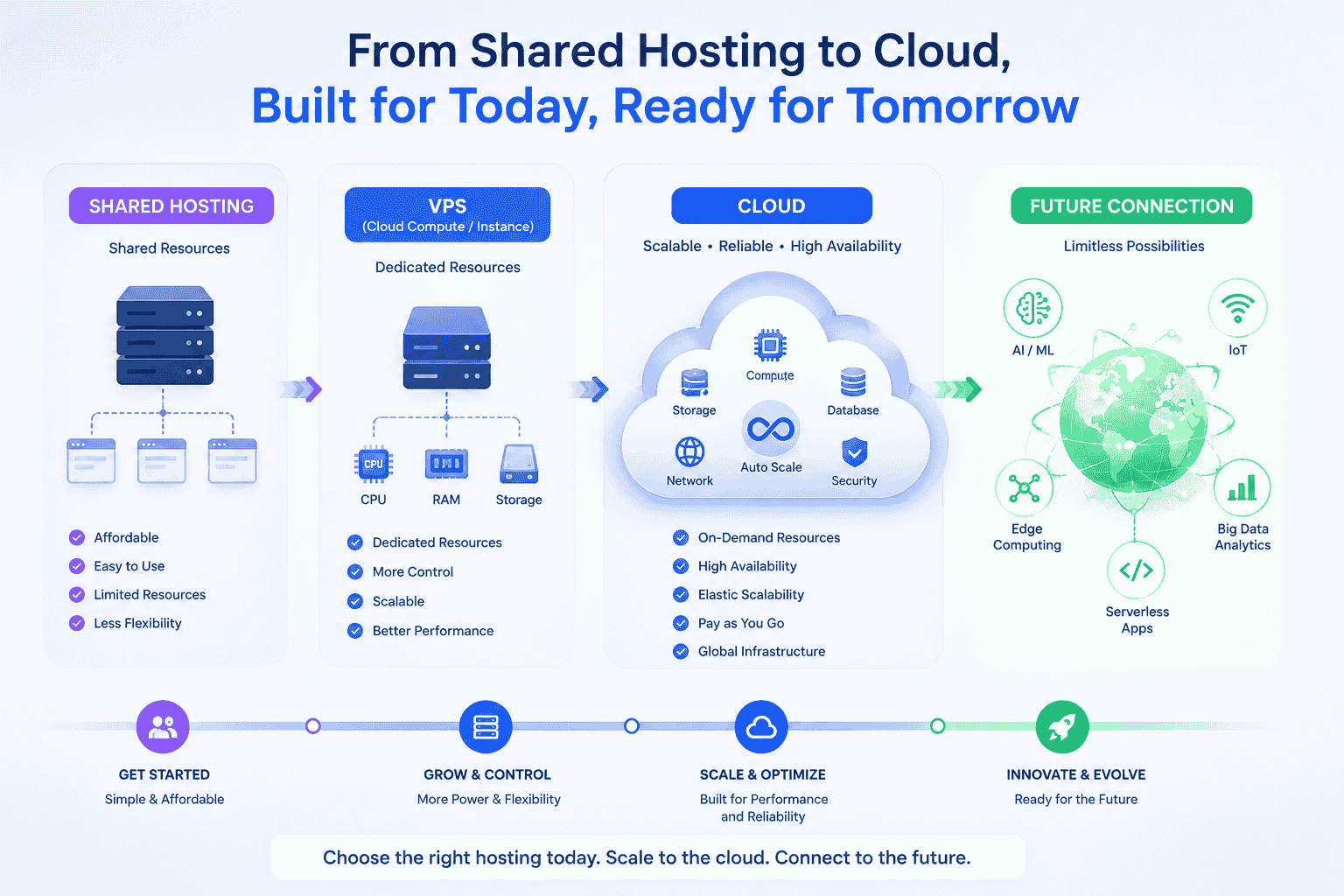
Section 1: Shared Hosting - Easy to Start, But Limited
Shared Hosting in 2026
What is shared hosting? You rent a corner of a server shared with many other users. Cheap, easy to start, and the provider handles most technical tasks.
Strengths:
- No technical skills required. Buy hosting, install WordPress with a 1-click installer, start writing.
- Support team available. If the server has issues, they handle it. You don’t have to stay up at night fixing things.
- Free SSL included. As of 2024-2025, most popular shared hosts (SiteGround, Bluehost, Hostinger ⚡, A2 Hosting, DreamHost) include Let’s Encrypt for free. No need to buy an SSL certificate separately.
- Server-level caching: SiteGround has SuperCacher (Nginx-based), A2 Hosting has Turbo Cache. Shared hosting isn’t completely without caching.
Weaknesses:
- Shared resources. When another site on the same server spikes (CPU/RAM), you are affected. The severity depends on the provider - SiteGround and A2 Hosting manage this better than ultra-budget hosts.
- No on-demand scaling. You can upgrade plans (from Basic to Plus, Starter to Business), but you can’t slide a RAM/CPU slider like on cloud platforms. As your site grows, shared hosting becomes a bottleneck.
- Limited control. You can’t install custom applications outside the allowed list.
Shared hosting makes sense when: you are just starting out, running a personal blog, have a non-revenue-critical site, or accept the trade-off of simplicity over control.
Section 2: Cloud Compute / Instances - Power Comes With Responsibility
What Cloud Instances Are, and Why They Aren’t for Everyone
A cloud instance (often called VPS in some markets) is a virtual server with full root access — you can install any software you want. But with that power comes system administration responsibility.
The Truth About Self-Managed Instances
A self-managed instance is not inherently more stable than shared hosting. A $6/month DigitalOcean Droplet can face all sorts of issues if you don’t know what you are doing: disk full from logs, Out-Of-Memory (OOM) killer, kernel panic, forgotten SSL renewal, brute-force attacks because you didn’t set up fail2ban, wide-open firewall rules. Shared hosting at least has a sysadmin team monitoring 24/7. When you self-manage, you are the sysadmin. Waking up to find your server has been down since 3 AM — that’s normal.
Scaling: not as painful as some articles claim. DigitalOcean ⚡ lets you resize a Droplet directly (downtime of a few minutes). Vultr does the same. Hetzner allows in-place upgrades. You don’t need to “buy a new server and migrate from scratch with hours of downtime” as many affiliate articles describe.
Support: not “non-existent”. DigitalOcean, Hetzner, and Vultr all have support tickets. They won’t help you configure Nginx, but they will help with infrastructure issues (network, hardware, billing). The scope is different from managed hosting, but it’s not zero.
The Time Investment Story
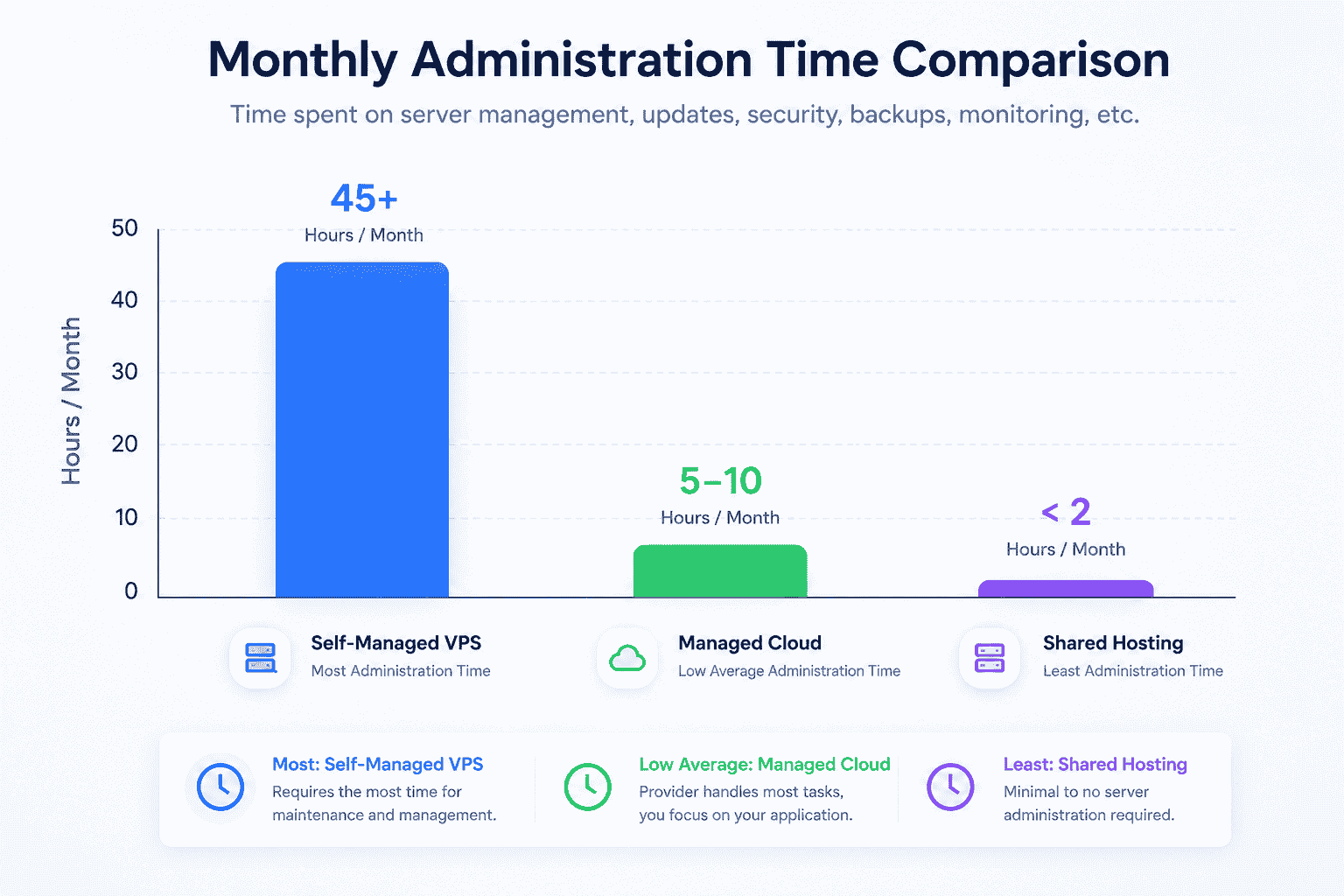
Monthly management time comparison: self-managed instances (highest), shared hosting (lowest), managed cloud (minimal ongoing effort)
Setting up an instance for the first time: 3-5 hours to install Nginx, MySQL, PHP, firewall, SSL, caching, backup scripts. This is not “lost time” - this is time spent learning your system. The second and third time will be faster - maybe 1-2 hours. With a control panel (CloudPanel, RunCloud, SpinupWP), it can drop to 30 minutes.
Calculations like “$50/hour x 4 hours = $200 for setting up a VPS” only make sense if you are actively skipping billable work. For beginners, those 4 hours are an investment in learning a skill — like learning how to use Excel or Google Analytics.
When Should You Use Cloud Instances (VPS / Droplets / Compute)?
- You are a developer / DevOps engineer comfortable with Linux.
- You need full root access for custom installations.
- You want to run non-PHP applications (Node.js, Python, Docker).
- You consider server administration a skill worth learning.
When Should You Avoid Them?
- You find command lines intimidating.
- You don’t have the time or desire to learn server management.
- Your website is your primary income source - you want someone else handling the infrastructure.
Key point: a self-managed instance can be less stable than shared hosting if you don’t know how to operate it. Don’t think “instances are the next level up from shared hosting” — they are different, not necessarily better.
Section 3: Managed Cloud Hosting — The Middle Layer
Managed cloud hosting is a management layer between you and cloud infrastructure. Instead of setting up an instance yourself, you rent a service that comes pre-configured: web server, caching, firewall, backup, monitoring.
Some platforms in this category:
- Cloudways ⚡: runs on DigitalOcean, Vultr, AWS, GCP, Linode.
- RunCloud: manages your own instance, keeps root access.
- GridPane: built for agencies and developers.
(Another category is platform-specific managed WordPress hosting like WP Engine, Kinsta, Flywheel - deeply optimized for WordPress, higher price, deeper features.)
What Managed Cloud Does Well
Built-in caching. Cloudways offers its Lightning Stack (Varnish + Redis + Memcached). You don’t need to install anything - just flip a switch. Many premium shared hosts (SiteGround, A2 Hosting) also have server-level caching. The difference: Cloudways gives you more cache protocols to choose from (Varnish, Redis, Memcached vs. Nginx-based cache only).
Staging environment. Create a clone of your site to test plugins, themes, and updates. Some shared hosts (SiteGround, Bluehost) now offer staging too. This is not exclusive to managed cloud.
Automated backup + fast restore. Snapshots taken daily, restore within minutes.
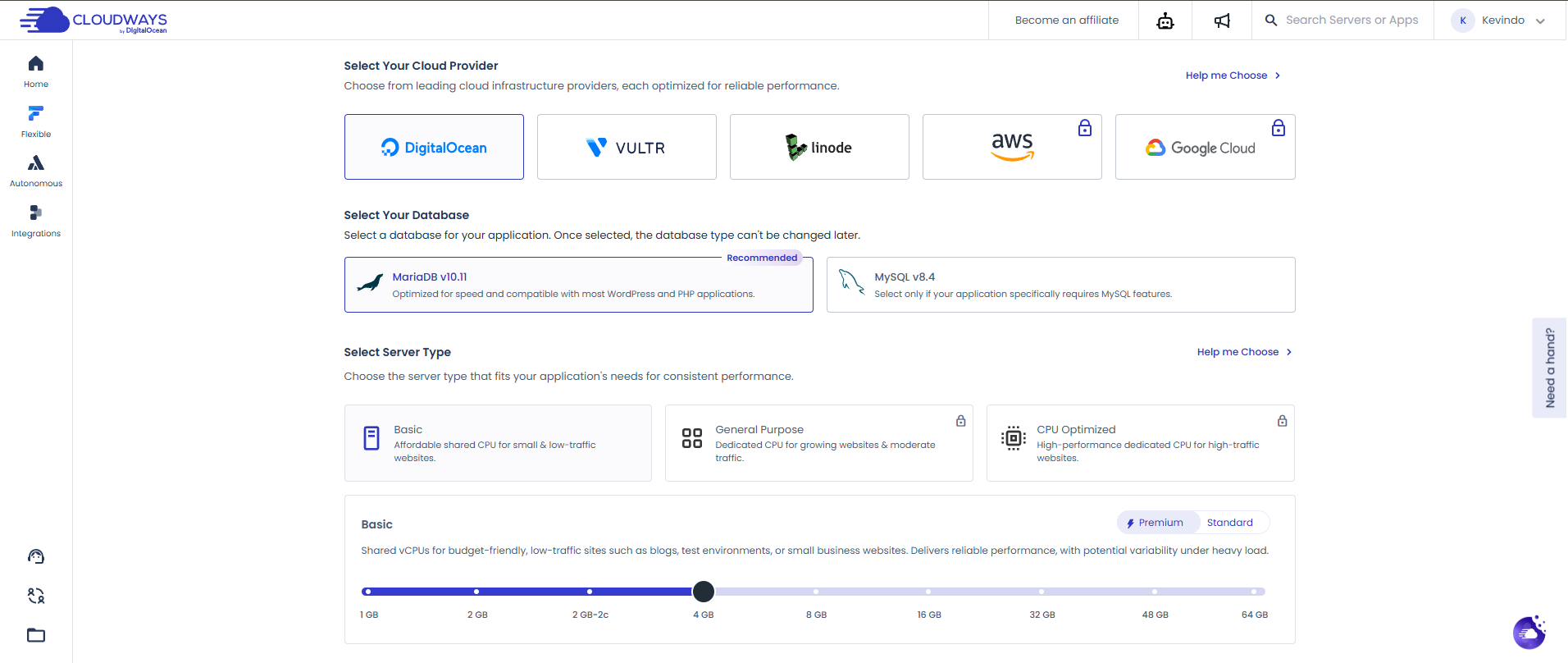
Cloudways managed cloud centralized dashboard: 1-click SSL, automated backup, toggle Varnish/Redis on/off, and real-time monitoring
Security. Cloudways uses Imunify360 - a CloudLinux product also used by many shared hosts running cPanel + CloudLinux. Not a proprietary feature.
Vertical scaling. You can increase RAM/CPU. Some providers require a server restart (brief downtime), not always “zero downtime”. The difference from self-managed instances: the process is simplified through a web interface.
What Managed Cloud Does NOT Do
- No full root access. You can’t install anything you want.
- PHP-optimized. If you need Node.js (n8n), Python, or Docker - self-managed instances are still the better choice.
- More expensive than shared hosting. $11-50/month vs. $3-10 for shared hosting.
- No bundled email hosting. You need a separate email service (Google Workspace, Rackspace, Elastic Email).
Side-by-Side: Six Hosting Paths
| Path | Monthly Cost | Tech Required | Control | Best For |
|---|---|---|---|---|
| Basic shared hosting (Hostinger, Bluehost,…) | $3-8 | None | Low | Personal blogs, small sites |
| Premium shared hosting (SiteGround GrowBig/GoGeek, A2 Turbo) | $10-25 | None | Medium | Small shops, 1-5 site agencies |
| Self-managed instances (DigitalOcean, Vultr, Hetzner) | $6-24 | Required | High | Developers, DevOps |
| Instance + control panel (RunCloud, CloudPanel, SpinupWP) | $10-20 (instance) + $5-10 (panel) | Moderate | High | Devs who want a UI |
| Managed Cloud (Cloudways,…) | $11-50 | Low | High (no root) | Agencies, shop owners, non-IT |
| Managed WordPress (WP Engine, Kinsta) | $20-200+ | Very low | Low (WP only) | WordPress-heavy, enterprise |
Each option has trade-offs. None is the “right answer for everyone”.
Section 4: Real-World Scenarios
Scenario 1: Personal Blog, 200-500 Visitors/Day
Basic shared hosting is sufficient. If you use SiteGround or A2 Hosting, your site will be noticeably faster than ultra-budget shared hosts thanks to server-level caching.
Only upgrade when: you start running ads, your site regularly peaks above capacity, or you need features not supported by your current plan.
Scenario 2: Agency Managing 5-15 WordPress Sites
You need easy management, staging, and backups. Three directions:
- Premium shared hosting (SiteGround GoGeek, A2 Hosting Turbo): $20-25/month for one server, unlimited sites. Has staging, caching, support. Easiest option, lowest risk.
- Managed Cloud (Cloudways): $11-50/month/server. Each server handles 3-5 sites depending on RAM. Choose appropriate config (2-4GB RAM for 3-5 WordPress sites). Scalable later.
- Instance + RunCloud: $10 instance + $6-9 RunCloud. Needs some technical skill, cheaper, more flexible, retains root access.
No best option - it depends on your skills and budget.
Scenario 3: E-Commerce Site
Online stores should avoid budget shared hosting - every second of delay loses orders. If you are not IT-savvy, Managed Cloud (Cloudways) or Managed WordPress (Kinsta, WP Engine) are safe bets. If you have technical skills, self-managed instances + SpinupWP or a custom setup with Redis + CDN can deliver excellent results at lower cost.
Section 5: Common Misconceptions
”Cloud instances are a step up from shared hosting”
No. Instances and shared hosting are different - different in terms of control, different in terms of responsibility. A poorly managed instance can be slower and less stable than a well-managed shared hosting account with a support team.
”Managed cloud is the only option for non-technical users”
No. Premium shared hosting (SiteGround, A2 Hosting) covers most needs without requiring a jump to managed cloud. If you have 1-2 sites and don’t need rapid scaling, premium shared hosting is a perfectly valid choice.
”Setting up an instance takes 4 hours - too time-consuming”
The first time, maybe. But those are 4 hours of learning, not 4 hours wasted. The second time will be faster. With a control panel, you can cut it to 30 minutes.
”Managed cloud backups mean I never lose data”
Backups are a safety net, not a perfect solution. Always maintain an off-site backup strategy for critical data, regardless of your hosting choice.
Section 6: A Simple Roadmap
- Starting from scratch with no website: Basic shared hosting. Learn WordPress first, don’t worry about infrastructure.
- Site growing (500+ visits/day): Consider upgrading to premium shared hosting (SiteGround, A2 Hosting) or try an instance + control panel if you want to learn.
- Managing client websites: Premium shared hosting (easier) or Managed Cloud (more flexible). Small agencies can start with SiteGround and migrate later.
- Developer who wants full control: Self-managed instances or instance + control panel. The time invested in learning server management is a valuable long-term skill.
You don’t need long-term commitments. Testing is the best way to know what works for you.
Frequently Asked Questions
Do I need to know Linux to run a website?
No. If you use shared hosting or managed cloud, you never touch the command line. You manage everything through a web interface. Self-managed instances require Linux knowledge.
How much should I spend on hosting?
It depends on your needs:
- Personal blog or hobby site: $3-10/month
- Small business or agency with 1-5 sites: $10-25/month
- E-commerce or high-traffic site: $20-200+/month depending on scale
Can I start with cheap hosting and upgrade later?
Yes. Most shared hosting providers let you upgrade plans without migrating. Moving from shared to managed cloud or instances requires migration, but tools and plugins exist to make this process straightforward.
What is the difference between “unlimited” hosting and cloud instances?
“Unlimited” hosting (shared plans) is never truly unlimited - the fine print caps CPU usage. Cloud instances or managed cloud give you dedicated resources, so your performance is consistent regardless of other users.
Is managed cloud worth the extra cost over shared hosting?
If your time is valuable and you’d rather not learn server administration, yes. The premium over shared hosting ($5-15/month difference) pays for automated backups, built-in caching, one-click SSL, staging environments, and a team handling security patches. If you enjoy learning the technical side, self-managed instances give you more control for less money.
Which providers offer free trials?
- Cloudways ⚡: 3 days free, no credit card
- SiteGround: 30-day money-back guarantee
- DigitalOcean ⚡ / Vultr: pay-by-the-hour, you can create and destroy instances without commitment
What if my site outgrows my hosting plan?
With shared hosting, you upgrade to a higher plan (more resources, higher visitor limits). With managed cloud, you scale vertically (increase RAM/CPU) through the dashboard without migrating. With self-managed instances, you can either resize the instance (brief downtime) or move to a larger one. All three paths are well-established.